12. AppKit and multiplatform
Status: draft
Chapter goal
The same task is done differently on each platform: a tap on iPhone, a keyboard shortcut on iPad, a menu command on Mac. Shared code is fine, but shared assumptions break accessibility. This chapter covers what changes when an iPhone app moves to iPad, Mac Catalyst or AppKit, and how to describe one task so it works on each.
The screen
The Leaf order history, moved from iPhone to iPad and then to Mac with Catalyst:
- Reorder exists only as a swipe action. On Mac, with VoiceOver and a keyboard, there is no visible way to it.
- No menu commands. The Mac menu bar has only the default File / Edit / Window items.
- The order list is read by Mac VoiceOver as "group" with no table semantics. No row count, no column headers.
- The selected row is highlighted, but keyboard focus is somewhere else.
- Hover shows the delivery date. Without a pointer, the date isn't reachable.
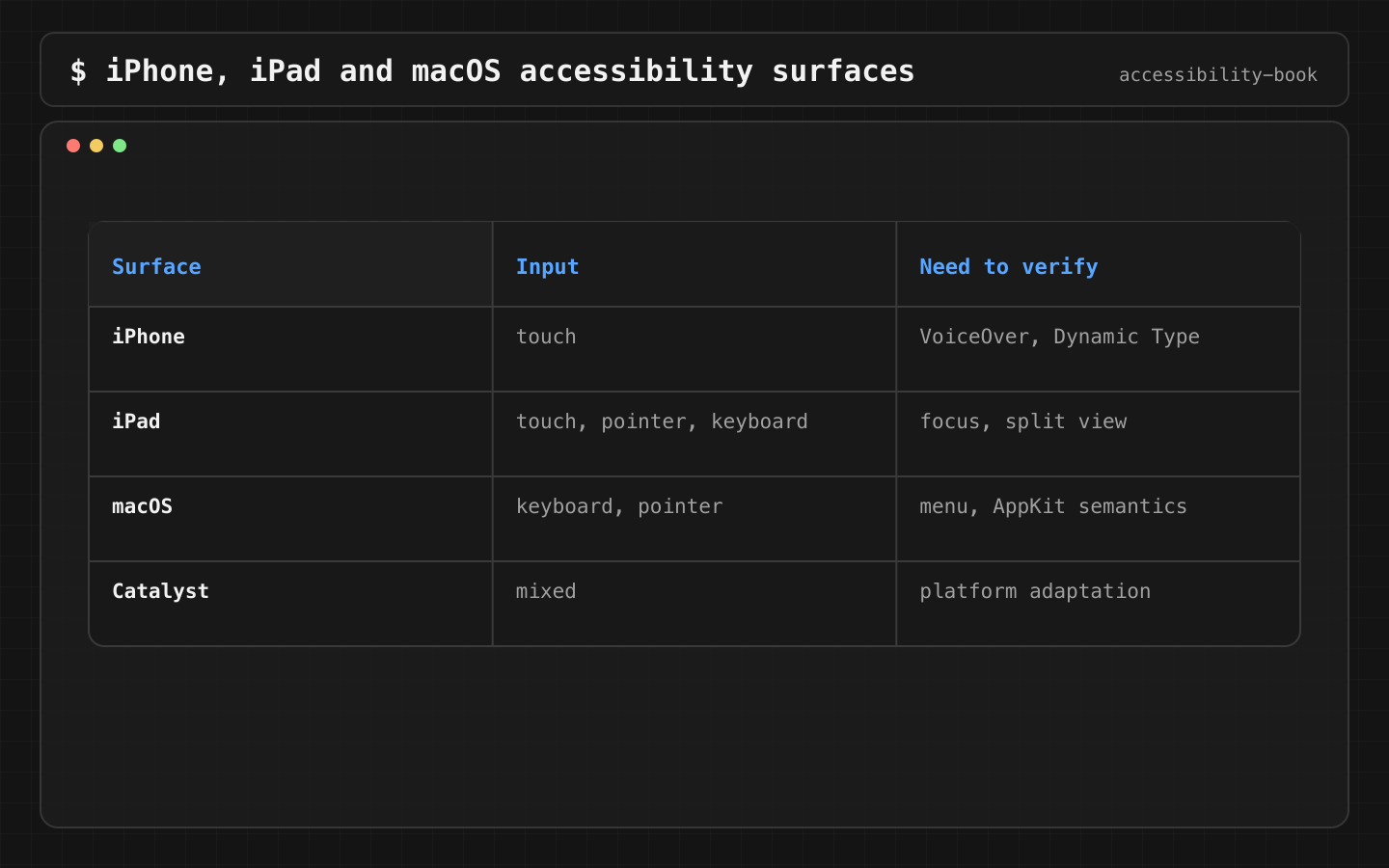
What each platform expects
| iPhone | iPad | Mac | |
|---|---|---|---|
| Primary input | Touch | Touch, keyboard, pointer | Keyboard, pointer |
| VoiceOver navigation | Swipe, rotor | Swipe, rotor, keyboard | VO keys (Control-Option), rotor, trackpad |
| Commands | Buttons, custom actions | Keyboard shortcuts, menu bar on iPadOS 26 | Menu bar, shortcuts, toolbar |
| Lists | List rows |
Rows plus keyboard focus | Tables with rows, columns, headers |
| Context menu | Long press | Long press, secondary click | Secondary click, Control-click |
On iPadOS 26, the menu bar is available on iPad too. Commands defined with SwiftUI .commands appear there and in the Command-key shortcut overlay.
Constraints
- One task, one meaning, different paths. The meaning is shared. The paths are written per platform.
- Mac VoiceOver is tested separately. Passing iPad QA doesn't mean the Mac app works. VoiceOver on Mac has different navigation and different expectations for tables and windows.
- Hover never carries information alone. Same rule as color and motion.
Decision 1: Important actions have a command
Verdict: every primary action on a selected item is also a menu command with a keyboard shortcut.
@main
struct LeafApp: App {
    var body: some Scene {
        WindowGroup { OrdersView() }
            .commands {
                CommandMenu("Order") {
                    ReorderCommand()
                }
            }
    }
}

struct ReorderCommand: View {
    @FocusedValue(\.selectedOrder) private var order

    var body: some View {
        Button("Reorder") { order?.reorder() }
            .keyboardShortcut("r", modifiers: .command)
            .disabled(order == nil)
    }
}
@FocusedValue gives the command access to the selected order in the active window. The view publishes it with .focusedSceneValue(\.selectedOrder, selection).
Why: a menu command can be found by browsing the menu bar, searched in Help → Search on Mac, triggered by keyboard, and read by VoiceOver. A swipe action can't be found on Mac at all.
Check: Mac: Order → Reorder works with the keyboard alone. iPad: hold Command, and Reorder ⌘R appears in the overlay.
Decision 2: A shared component has a written platform contract
Verdict: for every shared component, write down the meaning once and the path per platform.
OrderRow
Meaning:  one past order. Number, date, total, status. Primary action: Reorder.
iPhone:   row → details; Reorder button visible; Delete as swipe + custom action
iPad:     same + keyboard focus on row, context menu, ⌘R
Mac:      table row; Reorder in menu bar and context menu, ⌘R; Delete ⌫
Why: without the contract, each platform gets whatever the iPhone code produces. With it, the PR reviewer can check each path against the text.
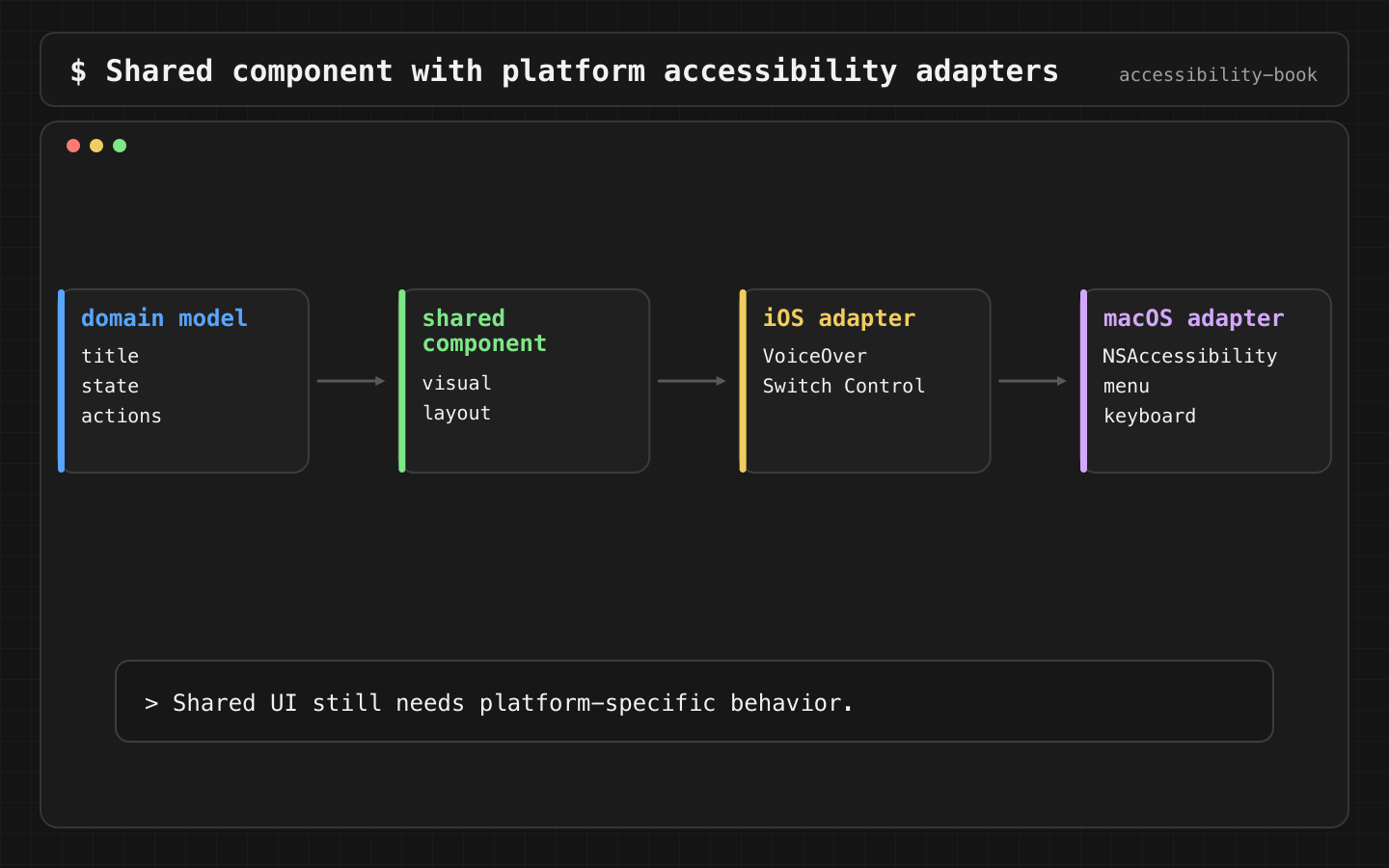
Details: Platform Interaction Contract.
Decision 3: Focus and selection are separate
Verdict: after closing a sheet or a window, keyboard and VoiceOver focus return to the selected row, and the selection doesn't change.
Why: selection is "which item is chosen". Focus is "where input goes now". After a details sheet closes, the user expects to continue from the same row. If focus goes to the sidebar while selection stays on row 7, the next arrow key moves in the wrong place.
@FocusState private var focusedOrder: Order.ID?

List(orders, selection: $selection) { order in
    OrderRow(order)
        .focused($focusedOrder, equals: order.id)
}
.sheet(item: $detailsOrder, onDismiss: { focusedOrder = selection })
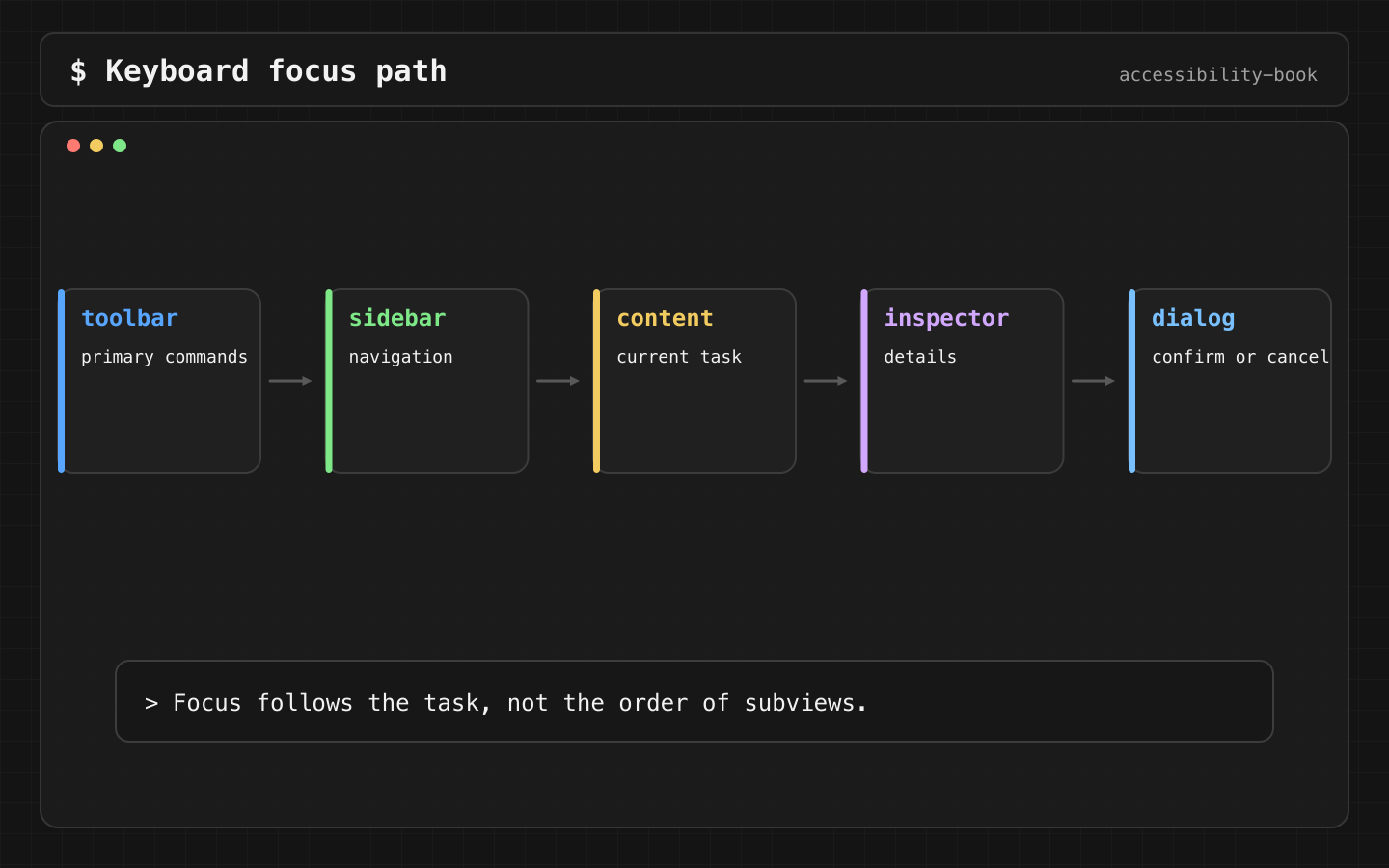
Check: open details with Return, close with Escape. The next Down Arrow moves to the next row, not to the sidebar.
Decision 4: Tables are tables on Mac
Verdict: tabular data on Mac uses Table in SwiftUI or NSTableView in AppKit. Not a VStack of rows.
Table(orders, selection: $selection) {
    TableColumn("Order", value: \.title)
    TableColumn("Date") { Text($0.date, style: .date) }
    TableColumn("Total") { Text($0.total, format: .currency(code: "USD")) }
}
Why: Mac VoiceOver reads tables with row and column position and column headers: "Total, $7.50, row 2 of 14". A stack of views is read as a group of text. The user loses position and context.
On iPhone, the same Table collapses to its first column, so the iPhone path needs its own row layout.
AppKit custom views
A custom NSView uses the NSAccessibility protocol: role, label, value, actions.
final class RatingView: NSView {
    var rating = 3

    override func isAccessibilityElement() -> Bool { true }
    override func accessibilityRole() -> NSAccessibility.Role? { .slider }
    override func accessibilityLabel() -> String? { "Rating" }
    override func accessibilityValue() -> Any? { "\(rating) of 5" }

    override func accessibilityPerformIncrement() -> Bool {
        rating = min(rating + 1, 5); return true
    }
    override func accessibilityPerformDecrement() -> Bool {
        rating = max(rating - 1, 1); return true
    }

    override var acceptsFirstResponder: Bool { true }
}
The role on Mac does what traits do on iOS. A custom view also needs acceptsFirstResponder, keyboard handling and a visible focus ring. Without them, it can't be reached by Tab.
Testing
- iPad: a hardware keyboard with Full Keyboard Access on, a pointer, Split View.
- Mac: VoiceOver (Command-F5), keyboard only, "Keyboard navigation" turned on in System Settings → Keyboard, Accessibility Inspector from Xcode.
- Both: RTL language, window resizing to the smallest size.
AI can find mobile assumptions before a Mac release:
Review this iPad screen before the Mac release. Find touch-only actions,
actions without menu commands, lists that should be tables, hover-only
information and custom views without keyboard focus.
What we don't do
- We don't ship Catalyst after iPad QA alone.
- We don't hide the focus ring for visual reasons.
- We don't put information only in hover tooltips.
Related catalog entries
- Platform Copy Paste: iPhone behavior copied to iPad or Mac.
- Reading Order Drift: order breaks in a different layout.
- Platform Interaction Contract: one task, platform-specific paths.
- Reading Order Contract: predictable order in complex layouts.
Chapter takeaway
Share the meaning, write the path per platform. Every primary action gets a menu command and a shortcut. Tables are tables. Mac VoiceOver is its own test.
Sources
- Apple Human Interface Guidelines: Accessibility
- Apple Human Interface Guidelines: Keyboards
- Apple Human Interface Guidelines: The menu bar
- Apple Human Interface Guidelines: Focus and selection
- Apple Developer: Commands
- Apple Developer: FocusedValue
- Apple Developer: NSAccessibilityProtocol
- Apple Developer: Table