Focus Black Hole
Status: ready
Symptom
After a sheet, an error or a reload, the user loses their place. VoiceOver focus stays behind the sheet, jumps to the top of the screen, lands on an element that no longer exists, or stays on the button that was just pressed.
User opens the address sheet.
VoiceOver still reads the cart behind it.
User taps Pay.
An error appears under the card field.
Focus stays on Pay.
Where it shows up
Bottom sheets, custom modals, payment errors, search reloads, filters, login, account recovery, media players, custom UIKit containers.
Why it blocks the task
The sighted user sees the new state. The VoiceOver user hears the old one. Switch Control and keyboard users may still be scanning behind a modal. The user has to rediscover where they are, what changed and where to continue. On a form with 10 fields, that's 10+ swipes per error.
Root cause
The visual UI changes, but nobody designed where focus goes.
- The new context doesn't get focus.
- The error appears, but focus stays on the submit button.
- Loading ends, focus stays on a skeleton that's gone.
- The sheet closes, focus doesn't return to the opener.
- An announcement was used instead of moving focus.
- A custom overlay doesn't block the content behind it.
Before
Button("Change address") { showingAddress = true }

if showingAddress {
    AddressPanel()            // custom overlay, not a .sheet
}
The panel appears. Focus stays on "Change address", and the cart behind the panel is still reachable.
Fix
Verdict: every change of context has a defined focus target. New context: its title. Error: the error text. Close: back to the opener.
Why: the user continues from the place where the task continues, without searching.
Native .sheet, .alert and .fullScreenCover move focus and block the background on their own. Use them. A custom overlay needs both done by hand:
@AccessibilityFocusState private var titleFocused: Bool

AddressPanel {
    Text("Delivery address")
        .accessibilityAddTraits(.isHeader)
        .accessibilityFocused($titleFocused)
}
.accessibilityAddTraits(.isModal)
.onAppear { titleFocused = true }
.isModal keeps VoiceOver inside the panel.
Error after submit: focus goes to the error text, not to an announcement. Code: Silent Error.
UIKit:
// new context: custom modal or container
panel.accessibilityViewIsModal = true
UIAccessibility.post(notification: .screenChanged, argument: panelTitleLabel)

// same screen, new point to continue from
UIAccessibility.post(notification: .layoutChanged, argument: errorSummaryLabel)

// on close
UIAccessibility.post(notification: .screenChanged, argument: changeAddressButton)
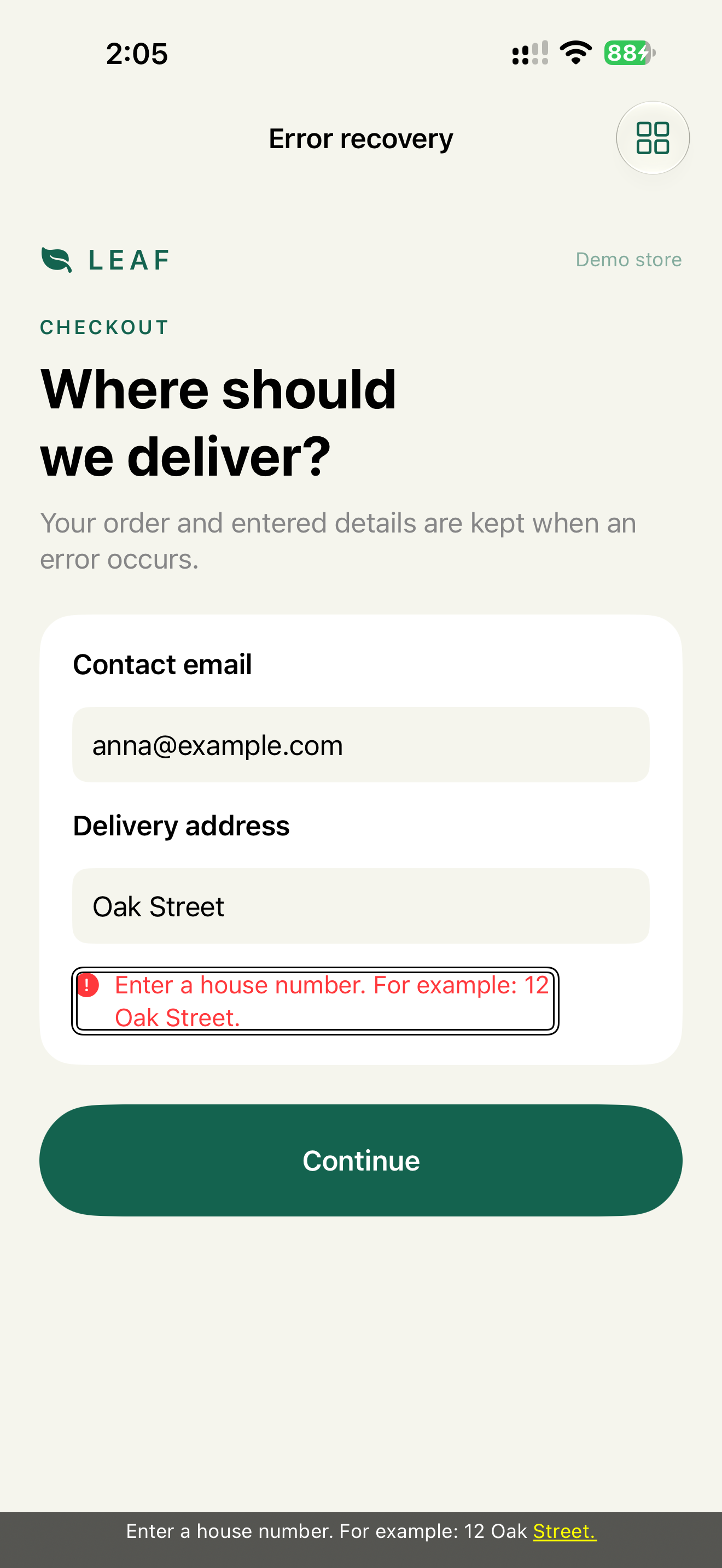
The demo's evidence test double-taps Continue with VoiceOver on and reads the speech without swiping. Focus is on the error right after the action. Chapter 13, Decision 2.
What we don't do
- We don't use
.announcementinstead of moving focus when the user has to act. "Payment failed" is spoken and gone, the user is still on Pay. - We don't move focus on cosmetic updates. Focus moves when the task moves.
Check
Profile:   VoiceOver
Task:      open the address panel, change the address, close it
Expected:  focus starts on "Delivery address, heading"
           the cart behind the panel is unreachable
           after close, focus is on "Change address"
Profile:   VoiceOver
Task:      submit the payment form with an expired card
Expected:  focus is on the error right after Pay, without swiping
Profile:   Switch Control
Task:      reload search results
Expected:  scanning doesn't stop on a loading element that's gone
WCAG mapping
2.4.3 Focus Order: focus follows the task state.3.3.1 Error Identification: the error can be found.3.3.3 Error Suggestion: the user can reach the fix.
App Store and product risk
In checkout, banking and account recovery, broken focus makes the flow practically unusable with VoiceOver or Switch Control. It's a product failure more than a review risk.