Adjustable controls
Status: draft
When to use this guide
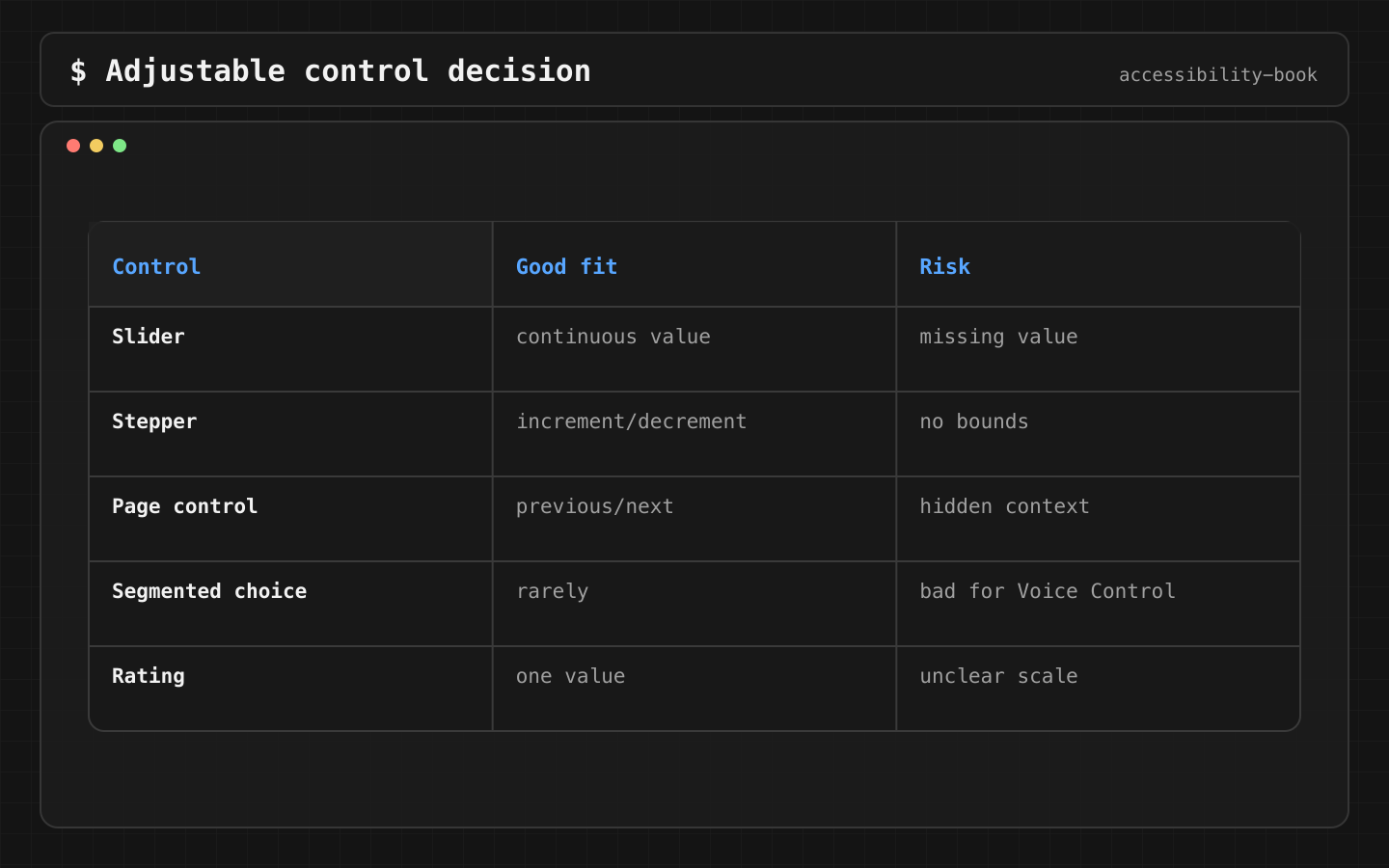
A slider, a stepper, a page indicator, a rating or an amount picker needs .adjustable for VoiceOver. Adjustable is the right tool for one value that goes up and down. It's the wrong tool when the user picks an option by name.
The rule
Verdict: adjustable for one ordered value (quantity, volume, rating, page). Separate buttons or a segmented control for named options (size, delivery speed, payment method).
Why: for VoiceOver, swipe up and down changes the value in one stop. For named options, Voice Control users want to say "Medium", not "Increase" twice, and VoiceOver users want to hear all options, not step through them blind.
| Control | Adjustable? |
|---|---|
| Quantity 1–10 | Yes |
| Rating 1–5 | Yes |
| Onboarding page indicator | Yes, the system one already is |
| Small / Medium / Large | No, separate choices |
| Today / Tomorrow / This week | No, separate choices |
Implementation
Native first. Stepper and Slider are already adjustable:
Stepper("Quantity: \(quantity)", value: $quantity, in: 1...10)
Custom SwiftUI control:
QuantityControl(value: quantity)
    .accessibilityElement(children: .ignore)
    .accessibilityLabel("Quantity")
    .accessibilityValue("\(quantity)")
    .accessibilityAdjustableAction { direction in
        switch direction {
        case .increment: quantity = min(quantity + 1, 10)
        case .decrement: quantity = max(quantity - 1, 1)
        @unknown default: break
        }
    }
UIKit. The trait promises increment and decrement, so both are implemented, and the value updates:
override var accessibilityTraits: UIAccessibilityTraits {
    get { super.accessibilityTraits.union(.adjustable) }
    set { super.accessibilityTraits = newValue }
}

override var accessibilityValue: String? {
    get { "\(quantity)" }
    set { }
}

override func accessibilityIncrement() { quantity = min(quantity + 1, 10) }
override func accessibilityDecrement() { quantity = max(quantity - 1, 1) }
Before and after:
// Before: three stops, "minus" and "plus" without context
HStack {
    Button("-") { quantity -= 1 }
    Text("\(quantity)")
    Button("+") { quantity += 1 }
}

// After: one stop, "Quantity: 2, adjustable"
Stepper("Quantity: \(quantity)", value: $quantity, in: 1...10)
Named options stay separate:
Bad:     "Delivery speed, adjustable"
Better:  "Today", "Tomorrow", "This week", each a button, the selected one with .isSelected
Check
Profile:   VoiceOver
Task:      set the quantity to 3
Expected:  one stop: name, value, "adjustable"
           swipe up and down change the value by 1
           the value doesn't go below 1 or above 10
Profile:   UIKit code review
Expected:  if the trait includes .adjustable,
           accessibilityIncrement() and accessibilityDecrement() exist
           accessibilityValue changes after each call
Profile:   Voice Control
Task:      choose a size
Expected:  "Tap Medium" works
           if the user has to say "Increase" several times, adjustable is the wrong choice
The audit catches a missing description:
try app.performAccessibilityAudit(for: [.trait, .sufficientElementDescription])
What we don't do
- We don't make a segmented choice or product tabs adjustable.
- We don't add
.adjustablewithout increment and decrement. - We don't let the value run past its limits.
Related materials
Chapter 5, Chapter 7, Chapter 10, Chapter 11, Semantic Control, Voice Control label audit, Rotor and custom actions, Accessibility testing toolkit.
Sources
Apple Developer: accessibilityAdjustableAction, Apple Developer: UIAccessibilityTraits adjustable, Apple Developer: UIAccessibility, Apple Developer: Performing accessibility audits for your app.